
|
Guide to Allowing Permissions for Course Playback and ISP Payments [Issue Affecting Chrome Version 141 and Later] by CGENTRY |
2025.09.30 12:20 |
|---|
Hello, this is CGENTRY.
In Chrome/Edge version 141 and later, the Private Network Access (PNA) policy is applied,
so if you play a course video or make a course payment (ISP) , a browser permission request popup may appear as shown below.
If the message appears, please check it according to the instructions in this notice.
A separate permission request popup may also appear when launching Kollus Player or using the Fullscreen feature.
In order for Kollus Player to work properly, these permissions must be allowed.
1. Local Network Access
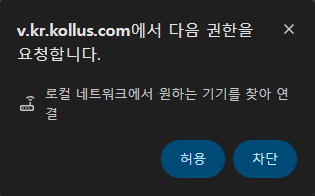
During testing, the following permission request popup may appear.
When the popup appears, please make sure to click the “Allow” button.
2. How to Restore Permissions If You Blocked Them
Click the site information icon on the right side of the browser address bar.
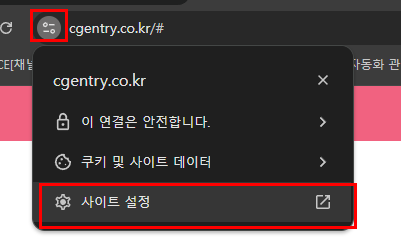
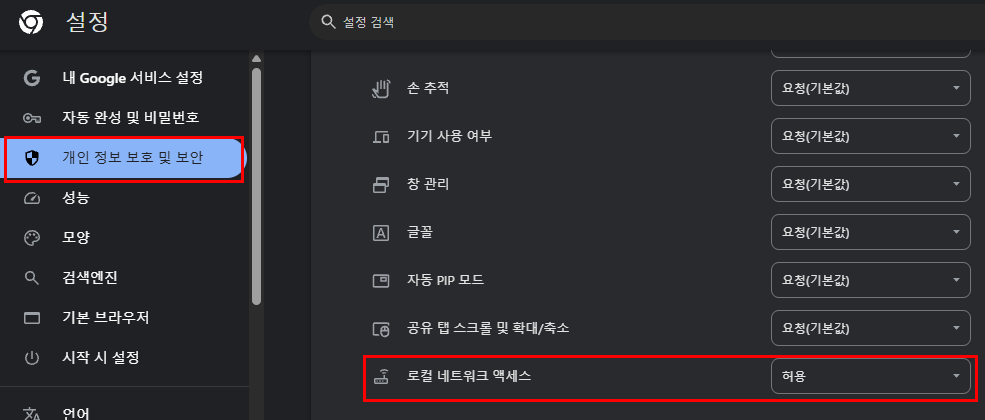
Go to Site Permissions → change the related item, such as Local Network Device Access, to Allow.
Common Information for Edge / Chrome: Both Chrome and Microsoft Edge display permission request popups in the same format.
Once you select “Allow,” the popup will not appear again on the same website.
Permissions are saved on a site-by-site basis, so the permission request may appear again on a different domain.
Views 2146